
Settings
Busy Lamp Field
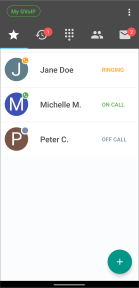
The Busy Lamp Field (BLF) displays the status of contacts saved as speed dials in the Quick Dials tab. Go to the Managing Quick Dials for more information about using BLF.
The BLF indicates the following status:
-
Off Call - The contact is not on a call.
-
Ringing - The contact is receiving a call.
-
On Call - The contact is making a call or in an active call.
Enabling Busy Lamp Field
The Busy Lamp Field feature is enabled by default. You can disable it on the Controls screen.
- To open Preferences:
- Android devices - On the Main screen, select
 > Settings > Preferences.
 - iOS devices - Open the Keypad tab, select
 > Preferences.
- Android devices - On the Main screen, select
- Select Controls.
- If disabled, toggle the Enable busy lamp field switch to enable.
Was this guide helpful?