
Settings
Setting Call Forwarding Mode
Configure how to redirect incoming calls without answering them using Groundwire. The SIP service icon on the Main screen appears blue when this mode is enabled.
Configuring Call Forwarding
- To set the global call forwarding setting that applies to the entire application:
- On the Main screen, select
 > Settings > Preferences > Call Forwarding.
 - To select the call forwarding mode:
Choose either one option only.
- Enabled (1) - Automatically redirects all incoming calls to a phone number.
- Forward to (2) - Set to direct all incoming calls to this specified phone number. This field is only visible after Enabled (1) is selected.
- Forward button (3) - Set to add the Forward button on the incoming call screen. Users can then redirect the call after selecting this Forward button.
- To set the call forwarding setting for a specific SIP account:
- On the Main screen, select > Settings > Accounts.
- Select the desired SIP account.
- Select Advanced Settings > Call forwarding.
- Set Enabled for the desired call forwarding mode and then add a Forward to phone number:
- Immediate forwarding - Redirects new incoming calls to the specified phone number without interacting with those calls.
- Forward when no answer - Redirects new incoming calls to the specified phone number when the calls are not answered.
- Forward when busy - Redirects new incoming calls to the specified phone number when the phone has an active call.
- Select
 .
.
- To set the global call forwarding setting that applies to the entire application:
- Open the Keypad tab, select
 > Preferences > Call Forwarding.
 - Slide the switch of Enabled (1) to the ON position.
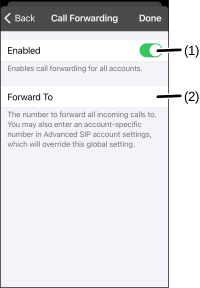
- Set a specified phone number in the Forward To field (2) to direct all incoming calls to this number. This field is only visible after Enabled (1) is selected.
- Select Done.
- To set the call forwarding setting for a specific SIP account:
- Open the Keypad tab, select > Accounts.
- Select the desired SIP account.
- Select Call Forwarding.
- Set Enabled for the desired call forwarding mode and then add a Forward To phone number:
- IMMEDIATE FORWARDING - Redirects new incoming calls to the specified phone number without interacting with those calls.
- FORWARD WHEN NO ANSWER - Redirects new incoming calls to the specified phone number when the calls are not answered.
- FORWARD WHEN BUSY - Redirects new incoming calls to the specified phone number when the phone has an active call.
- Select Done.
Was this guide helpful?