
Using Groundwire
Checking Call Usage
Groundwire usage report allows the users to monitor calling activities which include the call duration and frequency.
- On the Main screen:
- Android devices - Select
 > Settings > Usage.
 - iOS devices - Select
 > Usage.
The Usage screen displays.
> Usage.
The Usage screen displays.
- Android devices - Select
- (Optional) Select the Reset button to reset the Talk times and Call counts counters to zero.
Usage Screen
Use the Usage report to view the calling activity.
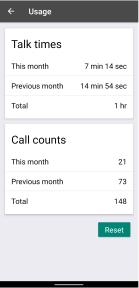
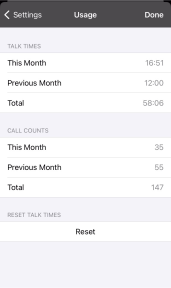
- Talk times - Displays the call duration in current month, previous month, and accumulated call duration since the call time counter is reset.
- Call counts - Displays the number of calls made in current month, previous month, and accumulated number since the call counter is reset.
Was this guide helpful?