
Using Groundwire
Main Screen
By default, Groundwire opens to the Keypad tab.
Screen Layout
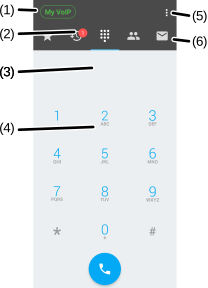
| (1) | Registration status - The color of the SIP Service icon indicates the account registration status. See the Monitoring the SIP Service Icon section for more information. |
|---|---|
| (2) | Tab notification dot - Keeps track of unread messages or missed calls. |
| (3) | Dialer input field - Displays the dialed number. |
| (4) | Dialer keypad - Press to make a call. |
| (5) | Settings button - Opens Settings to configure Groundwire settings. |
| (6) | Tab button - Tap to switch between application tabs: -  - Saves quick dials for the contacts frequently calling. - - Saves quick dials for the contacts frequently calling. -  - Displays the call history. - - Displays the call history. -  - Use the dialer to call new phone numbers. - - Use the dialer to call new phone numbers. -  - Displays the contact directory. - - Displays the contact directory. -  - Uses chat to send messages to other contacts. - Uses chat to send messages to other contacts. |
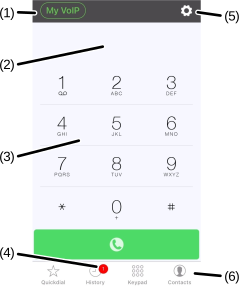
| (1) | Registration status - The color of the SIP Service icon indicates the account registration status. See the Monitoring the SIP Service Icon section for more information. |
|---|---|
| (2) | Dialer input field - Displays the dialed number. |
| (3) | Dialer keypad - Press to make a call. |
| (4) | Tab notification dot - Keeps track of unread messages or missed calls. |
| (5) | Settings button - Opens Settings to configure Groundwire settings. |
| (6) | Tab button - Tap to switch between application tabs. |
Was this guide helpful?