
Using Groundwire
Managing Media Files
The media files that users can exchange with other users include documents, photos, videos, and audio files. Also, they can delete, share, and forward these media files to other contacts.
Managing Received Media
Touch and hold the media message (5). A check  (1) mark indicates the message is selected. Select an option:
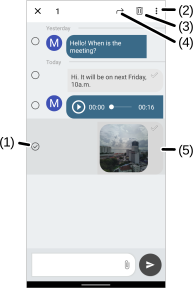
 (4) - Sends the message to other contacts with Groundwire.
 (3) - Removes the message.
 (2) - Opens additional options:
- Share - Sends the message to others using other applications.
- Download file - Saves a copy of the file to the mobile device.
- Delete file - Removes the message.
Touch and hold the media message (4). Select an option:
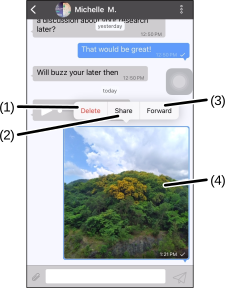
- Delete (1) - Removes the message.
- Share (2) - Sends the file to others using other applications.
- Forward (3) - Sends the file to other contacts with Groundwire.
Was this guide helpful?