
Using Groundwire
Sending Audio Messages
Send audio messages to others instead of typing messages or calling them.
Recording and Sending Audio
- Open the conversation in the Messages tab.
To begin a new conversation with a contact, go to the Sending Messages section for more information.
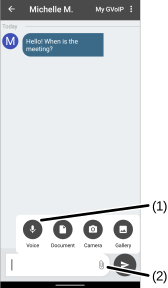
- Select
 (2) > Voice
  (1).
(1). 
- Select the Record
 (3) button to start recording. The button starts blinking and the timer is counting up.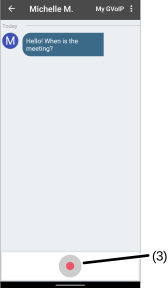
- Select the blinking Record button to stop recording.
- (Optional) Enter a text message if needed.
- select the Send button.
- Open the conversation in the Messages tab.
To begin a new conversation with a contact, go to the Sending Messages section for more information.
- Select
 > Record Voice Message (1).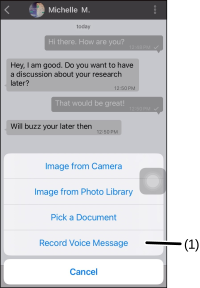
- Select the Record (2) icon to start recording. The timer is counting up. Select X (3) to cancel sending a voice message.
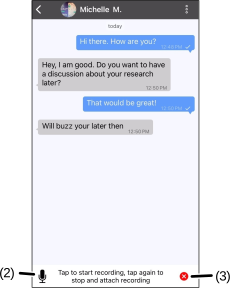
- Select the Record icon to stop recording.
- (Optional) Enter a text message if needed.
- select the Send button.
Was this guide helpful?