
Settings
Do Not Disturb Mode
Use Acrobits Softphone's Do Not Disturb (DND) mode to block notifications from calls and new messages. Users do not receive incoming calls but the rejected call logs are captured in the History tab.
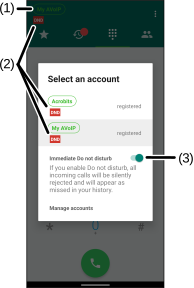
The SIP service icon on the Main screen displays a red DND label (2) when enabled.
Setting the DND Mode
Enable or disable DND mode manually that applies to all SIP accounts.
-
Select the SIP service icon (1) on the Main screen.
-
Toggle the Do Not Disturb switch (3) to turn on or off manually.
Was this guide helpful?