
Using Softphone
Managing Contacts
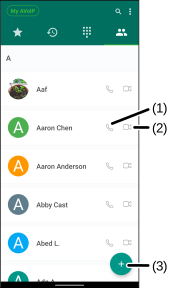
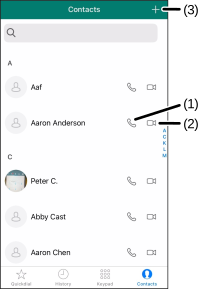
Open the Contacts tab to access all the contacts in the phone.
-
Touch the Add + (3) icon to add new contacts.
-
Touch the following icons beside the name of the contact:
Call  (1) - Makes an audio call.
- Video
 (2) - Makes a video call.
Editing Contacts
Users can update information to existing contacts and delete contacts in the address book.
- To edit a contact's information:
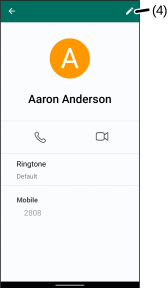
- Open the Contacts tab, and then select the contact that needs updates.
-
Select the Edit
 (4) icon.
 -
Make changes and then select Save.
- To delete a contact:
-
Open the Contacts tab, and then select the contact.
-
Select Edit
(4) >  > Delete.
- To edit a contact's information:
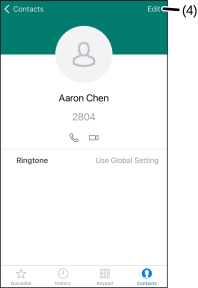
- Open the Contacts tab, and then select the contact that needs updates.
-
Select Edit (4) > EDIT.
-
Make changes and then select DONE.
- To delete a contact, open the Phone application on your device and remove it.
Was this guide helpful?