
Mid-Call Operations
In the middle of an active phone call, Acrobits Softphone allows the user to put the call on hold, record calls, transfer calls (attend and unattended), merge calls, and open a dual-tone multi-frequency (DTMF) keypad.
Call Screen Controls
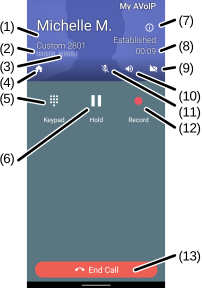
(1) Displays the call participant’s photo, if available.
(2) Displays the audio input level of the call participant’s microphone.
(3) Displays the audio input level of the user’s microphone.
(4) Select to open the application screen.
(5)
Select the Keypad  button to open the dual-tone multi-frequency (DTMF) keypad.
(6)
Select the Hold  button to put the call on hold. The user can hold or resume the call by toggling this icon.
(7)
Select the Information  icon to open the metric displaying the call quality.
(8) Displays the call duration.
(9)
Select the Camera  icon to open the camera and initiate a video call.
(10)
Select the Speaker  icon to turn on the loudspeaker. The user can turn the loudspeaker on or off by toggling this icon.
(11)
Select the Microphone  icon to turn off the microphone. The user can mute or unmute the microphone by toggling this icon.
(12)
Select the Record  button to start and stop recording the call.
(13) Select the End call button to dismiss the call.
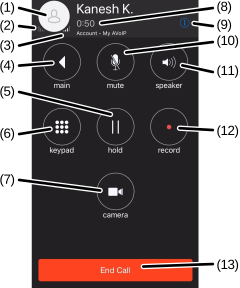
(1) Displays the call participant’s photo, if available.
(2) Displays the audio input level of the user’s microphone.
(3) Displays the audio input level of the call participant’s microphone.
(4) Select to open the application screen.
(5)
Select the hold button to put the call on hold. The user can hold or resume the call by toggling this icon.
(6)
Select the keypad  button to open the dual-tone multi-frequency (DTMF) keypad.
(7)
Select the Camera  icon to open the camera and initiate a video call.
(8) Displays the call duration.
(9)
Select the Information icon to open the metric displaying the call quality.
(10)
Select the Microphone icon to turn off the microphone. The user can mute or unmute the microphone by toggling this icon.
(11)
Select the Speaker icon to turn on the loudspeaker. The user can turn the loudspeaker on or off by toggling this icon.
(12)
Select the record button to start and stop recording the call.
(13) Select the End Call button to dismiss the call.
Was this guide helpful?